← Changelog
v0.32.0October 12, 2026
In-App Terminal: Exec, Debug & Attach
This release brings a terminal into Zapkube: exec, debug or attach to a container without leaving the app or opening another window.
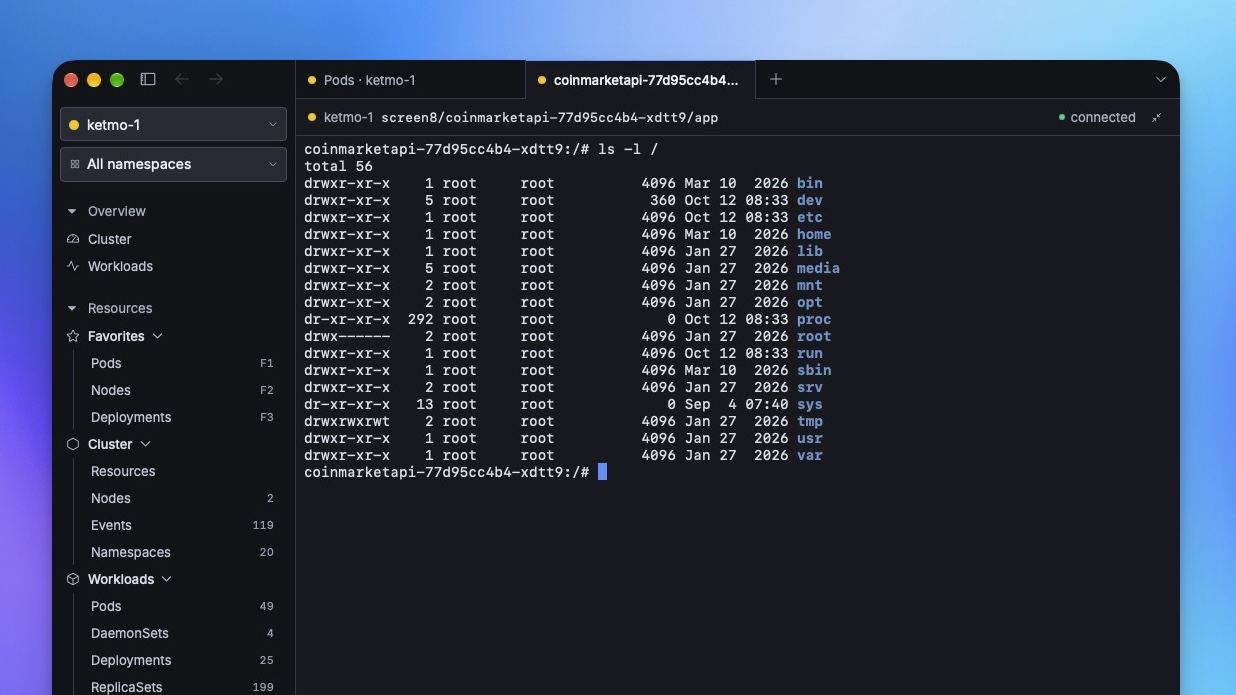
💻 Built-in Terminal
- Exec, Debug or Attach from a container's menu or the command palette. The session opens in a new tab. Debug adds an ephemeral debug container and removes it when you're done.
- An Exec tab on pod pages: choose a container and connect.
- Sessions keep running when you switch tabs or move panels between windows. Zapkube asks before closing or quitting would end one.
- A Shells button in the status bar lists your open sessions. Reconnect brings an ended session back.
- Keyboard-first: Esc Esc leaves the terminal and ⌘E (Ctrl+E on Linux and Windows) jumps back in. Find, copy, paste and zoom work from the keyboard.
- Settings › Terminal: shell command, font size, copy on select and cursor style.
🗂️ Tab Drag & Drop
- Reorder tabs by dragging: the other tabs slide aside as you drag, and Esc cancels the drag.
- Tear a tab off by dragging it out of the window. On macOS, the new window follows your pointer.
- Merge a tab into another window by dropping it on that window's tab bar. On macOS, a gap opens where the tab will land.
- Pull a panel out of a background tab by dragging that tab onto the active tab.
- Move tab left / right from the command palette.
✨ Other Improvements
- Middle-click a tab to close it.
- External terminal suggestions: the Exec, Debug and Attach menus now suggest the first terminal app you installed (iTerm2, Ghostty, kitty…), ahead of the one bundled with your OS, until you pick one in Settings.
🐛 Fixes
- kitty on macOS now launches correctly as an external terminal.
- Tearing off a tab on Linux now opens a new window when you release it outside the app.
🧹 Misc / Chore
- Bumped frontend and Go dependencies.