← Changelog
v0.34.0November 4, 2026
Combined Kubernetes Logs & Connection Status
This release is about logs and connection awareness: follow the logs of many pods at once, and see at a glance when a cluster drops and comes back.
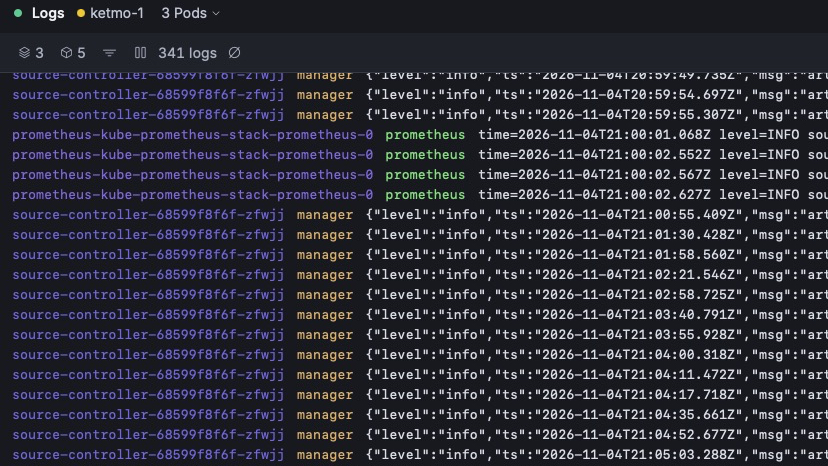
📜 Combined Logs
- The Logs page streams the logs of a whole set of resources in one view, instead of one pod at a time.
- Logs from the row menu, or press L: open the logs of the selected row straight from a resource list.
- Pod picker with a section per picked resource: add or remove resources and pods without leaving the page.
- Deleted resources are handled: when a picked resource disappears while the page is open, it is flagged instead of breaking the stream.
- Copy kubectl gives you the matching
kubectl logscommand, one per resource.
🔌 Connection States
- Contexts are Connected, Reconnecting or Disconnected: the Context selector shows amber for reconnecting and red for disconnected, with the cause.
- Automatic reconnect: a Context that drops, from a Wi-Fi cut or a restarting control plane, turns Reconnecting and recovers on its own. Reconnect is also available by hand.
- A truthful Live status dot in the list header: green, amber, red or grey, per Context. A forbidden resource shows as Limited access rather than a failure.
- The Activity count leaves out tasks on Contexts that are not connected.
⚡ Quick Actions & Nodes
- Quick actions sit in the detail tab row, declared per Kind.
- Nodes: Cordon and Uncordon become Pause and Play, with an icon that follows the node's state, and Drain becomes Eject.
🐛 Fixes
- Tab strips no longer scroll vertically or bounce on macOS, and fade at their hidden edges.
- Links no longer start a native drag in the desktop app.
🧹 Misc / Chore
- Updated Go and frontend dependencies, including Wails v3.1.0.