← Changelog
v0.26.0August 27, 2026
Command Palette Resource Search & Favorites
This release turns the command palette into a real navigator: search any resource by name, jump to a kind with Cmd+P, and pin the types you use every day.
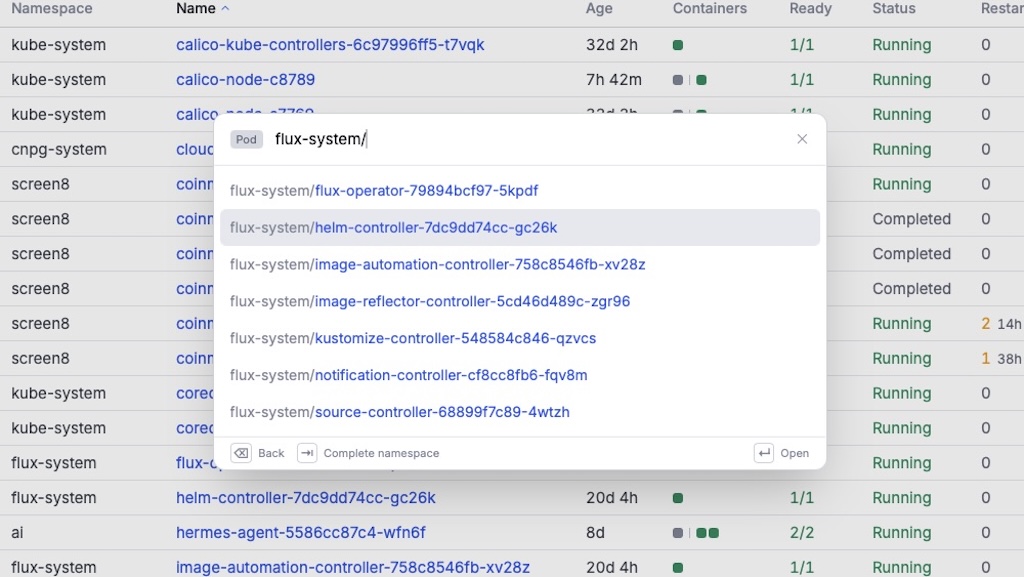
🔍 Search Resources by Name
- Search individual resources straight from the palette — highlight a kind and press
/to drill into it, then type a pod (or any resource) name to jump directly to it. No more opening the list first and filtering by hand. - Searches every namespace at once, and understands
namespace/name— type either half of the pair and the palette narrows accordingly, or let it complete a bare namespace fragment for you. - Reads a row as
namespace/name, shows only the deepest scope chip, and keeps the drill page's chrome quiet so the results stay the focus. - Fast by design: the drill page lists objects once, without opening a watch, and ranks matches before capping the result set.
⌨️ Cmd+P — Go to Resource
Cmd+Popens the palette in resource-navigation mode: only resource kinds, none of the page-specific actions. The same view is reachable by typing the>prefix from the root palette.- Works on an already-open palette, so
Cmd+K→Cmd+Pswitches modes without closing anything. - New footer hint bar shows the keys available in the current mode as keycaps — including how to leave a mode or pop back out of a sub-page.
⭐ Favorite Resource Types
- Pin the resource types you use most — favorite them three ways (sidebar context menu, list toolbar, view toolbar) and they surface in a dedicated Favorites section at the top of the sidebar.
F1–F12jump straight to the Nth favorite.- Drag to reorder the Favorites section, and the command palette's "Go to resource" leads with your favorites.
- Favorites persist in
settings.jsonalongside the rest of your preferences.
✨ Other Features
- Changed-cell highlighting — cells whose value changed on the last watch tick briefly wash to draw the eye, so you can see a rollout progress without staring at the whole table. Opt-in via a new setting, and suppressed under
prefers-reduced-motion. - Nodes: new Cordoned column — a dedicated Yes/No column that folds into Status when hidden, so cordoned nodes stay visible either way.
- Custom resources are grouped by vendor domain in the sidebar, keeping long CRD lists navigable without over-collapsing large or
x-k8s.iogroups.
🐛 Fixes
- Quick filter no longer matches against Yes/No columns, which produced surprising results when typing "no".
- Column auto-fit accounts for folded cells and hidden columns, so Restarts and Status size correctly against what's actually rendered.
- Favorite star uses the same amber across light and dark themes.
- Flashing rows stay hoverable, and the highlight resets cleanly when the preference is turned off.
🧹 Misc / Chore
- Bumped Go and frontend dependencies.